

Section 01
What Are the Three Main Approaches to Building an AI Adult Companion in 2026?
When building an AI adult companion, there are three distinct architectural approaches: extending an existing open-source frontend (SillyTavern or Agnai), deploying a white-label or fork of a hosted platform as your product's foundation, or building a fully custom stack from scratch. The choice determines your technical dependencies, infrastructure costs, product flexibility, and time to first working prototype.
Three Build Architectures — Development Effort vs Product Control
Choosing the Right Build Architecture
Forking SillyTavern is the fastest path to a working prototype — the frontend, the character card system, the prompt engine, and the LLM connector are already built. You add your own branding, restrict the backend connections to your chosen model, and ship. The limitation is that SillyTavern's codebase is a Node.js application designed for single users, not a multi-tenant SaaS product — scaling it to serve thousands of concurrent users requires significant architectural changes.
Self-hosting and extending Agnai is the more appropriate starting point for a multi-user product. Agnai is designed as a hosted service with user accounts, separate conversation histories, and a backend API. Its codebase is released under AGPL-3.0 — not MIT. This is a critical legal distinction: AGPL-3.0 requires that any modified version run as a network service must also release its source code publicly. For a closed-source commercial product, this means either building on top of Agnai without modifying core files, negotiating a commercial licence, or choosing a differently licenced starting point.
Building a fully custom stack is the right choice when the product requires a proprietary codebase or data architecture that AGPL-3.0 would force you to disclose.
Section 02
What Existing Platforms Can You Study, Fork, or White-Label as the Foundation of an AI Companion Product?
Before building from scratch, understanding what existing companion platforms have already solved is the most efficient starting point. Platforms like Crushon.AI, Agnai, and Chub AI represent years of product iteration on the UI layer, character system, and moderation architecture. Their open-source components can be forked; their product decisions inform your own design; and for early-stage validation, deploying a self-hosted version lets you test demand before committing to a full custom build.
| Platform | NSFW Allowed | Access Model | Character Source | Best For |
|---|---|---|---|---|
| Crushon.AI | Yes — explicit allowed with account | Free tier + paid plans | Community + create your own | Hosted NSFW chat with zero setup |
| Agnai.chat | Moderate — depends on server settings | Free (hosted or self-hosted) | Import SillyTavern cards | SillyTavern alternative without local setup |
| Janitor AI | Yes — with NSFW toggle enabled | Free via JanitorLLM (built-in model); own API key optional for other models | Community cards, own API or JanitorLLM | NSFW chat without needing own API key |
| Chub AI (Chub Venus) | Yes — explicit, NSFW characters | Free + premium tiers | Largest character card repository | Finding and chatting with pre-built characters |
| Spicy Chat AI | Yes — adult content allowed | Free + token system | Community + creator tools | Quick adult companion chat, no API setup |
🔧 What to Study in Each Platform's Architecture
Each platform solves specific engineering problems worth studying before building your own. Agnai's multi-user account system and WebSocket chat architecture are reference implementations for real-time companion chat at scale. Chub AI's character card schema and tag taxonomy is the most mature content organisation system in the ecosystem — replicating its filtering and discovery system saves weeks of product design. Crushon.AI's onboarding flow and character creation UX represents validated design decisions for converting new users into active companion users. Study what works before building from scratch.
Section 03
How Can SillyTavern Be Used as a Foundation or Reference Architecture for Building an AI Companion?
SillyTavern is a free, open-source Node.js application (MIT licence, 25,000+ GitHub stars) that implements a complete AI companion frontend — character cards, lorebooks, prompt engineering, memory summarisation, group chats, TTS, and image generation hooks. For developers, SillyTavern is most useful as a reference implementation and local development environment — not as a forkable foundation for a multi-tenant SaaS product, since its architecture is designed for a single user running it locally.
SillyTavern's Architecture — What It Provides Out of the Box
SillyTavern is built as a single-page Node.js application that connects to LLM backends via a configurable API connector layer. Its architecture separates the frontend interface (HTML/CSS/JS), the backend proxy server (Express.js), and the model backend (any external API or local server). This separation makes it straightforward to fork: you can replace the frontend entirely with your own React or Vue UI while keeping the backend connector layer, or extend the existing frontend with new components while pointing at a different model backend.
The prompt engineering pipeline — how character data, lorebook entries, memory summaries, and user messages are assembled into the context sent to the model — is fully configurable through SillyTavern's prompt template system. Understanding this pipeline is essential for building any companion product, because the quality of the assembled context determines the quality of the AI's responses more than any other single factor. SillyTavern's implementation is a working reference for how to structure this assembly correctly.
KoboldCpp — The Local Model Server SillyTavern Connects To
KoboldCpp is a single-executable local LLM server that runs GGUF-format models on CPU or consumer GPU and exposes a REST API at localhost:5001. In a development stack, it serves as the model backend that SillyTavern (or your own frontend) calls for completions. For building a self-hosted adult companion with no content filtering and no API costs, KoboldCpp running an uncensored model is the standard local backend — the model file is the only external dependency, and once downloaded the system runs entirely offline. For local development with a simpler setup, Ollama is an alternative — it uses its own API format (not KoboldCpp-compatible) and is easier to manage, but is equally a local/desktop tool. Neither KoboldCpp nor Ollama is designed for high-throughput multi-user production; for that, vLLM or Aphrodite Engine are the correct choices, as they are purpose-built for serving LLMs to concurrent users at scale.
Section 04
How Do You Implement the Character Card System in an AI Companion Product?
A character card is the data structure that defines a companion's identity — name, backstory, personality description, dialogue examples, and conversation scenario stored as a JSON object. In SillyTavern and Agnai, this data is embedded as metadata inside a PNG image file; in a custom build, it is stored in a database and retrieved at session start to populate the LLM's system prompt. Implementing a robust character system is the first major product decision after choosing the tech stack.
The Character Card Data Schema
The community-standard character card format is the Chara Spec v2 — an open JSON schema that defines the fields every character card must contain. The core fields are: name, description (the character's appearance and traits), personality (behavioural tendencies in short phrases), scenario (the opening situation), first_mes (the character's first message to the user), mes_example (sample dialogue pairs that train the model's tone), and system_prompt (optional override of the global system prompt). In a custom build, each of these maps directly to a database column and is injected into the LLM context in a defined order at conversation start.
Chub AI and Character Tavern host thousands of Chara Spec v2 cards as downloadable PNG files — useful not for importing into your product directly, but as a dataset for studying how experienced character designers write effective system prompts. The quality of the description, personality, and mes_example fields in highly-rated cards on Chub AI is a practical reference for how to design your own character creation interface.
Lorebooks — Context Injection for World-Building
A lorebook is a trigger-based context injection system: a JSON file containing entries, each with a set of keywords and a body of text. When a keyword appears in the recent conversation history, the corresponding lorebook entry is automatically injected into the LLM's context window before the next generation. In practice, this allows a companion to "know" things about its world without those facts consuming permanent space in the system prompt — they are retrieved only when relevant. In a custom build, the lorebook system is implemented as a simple keyword-matching step between the user's message and a lookup table of context entries, with the matches appended to the context assembly before the LLM call.
Section 05
What Tools Handle Memory in an AI Companion — So It Remembers Past Conversations?
AI companion memory requires two mechanisms: a store for the raw conversation history and a retrieval system for finding relevant past context. In SillyTavern, chat history is stored as JSON files with a built-in summarisation extension. In custom stacks, a vector database handles semantic search over past conversations — retrieving the most relevant past messages based on meaning rather than recency. The five tools in the table above each represent a different trade-off between ease of setup, hosting model, and compliance with adult content use cases.
| Tool | Type | Licence | Best For |
|---|---|---|---|
| ChromaDB | Vector database — local | Free, open source | Custom stack memory — runs locally, Python-native |
| Pinecone | Vector database — hosted cloud | Free tier + paid cloud | Production-scale memory — ⚠️ verify TOS: Pinecone is a proprietary managed service with content policies that may prohibit explicit NSFW data |
| Qdrant | Vector database — local or hosted | Free self-hosted; paid cloud tier | High-performance semantic search, open source |
| SillyTavern Summarise | Built-in extension | Free, open source | Automatic summary compression for long chats |
| Supabase (PostgreSQL) | Relational database + pgvector | Free tier + paid plans | Combined vector memory + structured user data storage |
How Each Memory Tool Fits the Stack
ChromaDB is the default choice for self-hosted custom stacks — it runs locally as a Python process, requires no external service, and integrates natively with LangChain and LlamaIndex. It is the right tool for development and for production stacks where all data must stay on-premise. Qdrant is a higher-performance alternative to ChromaDB: also open-source and self-hostable, but with a Rust-based engine that handles larger vector collections more efficiently and offers a managed cloud tier for teams that want infrastructure managed without the content policy risks of proprietary platforms.
Pinecone is a fully managed cloud vector database — fast and easy to set up, but carries a significant risk for adult companion applications: its Terms of Service prohibit certain types of explicit content stored in its index. Self-hosted alternatives (ChromaDB or Qdrant) are strongly recommended for any adult content stack to avoid account termination. SillyTavern's built-in Summarise extension addresses the memory problem differently — it uses the LLM itself to compress old conversation turns into a rolling summary that stays within the context window, requiring no external database. This is the right approach for single-user deployments where persistence across sessions is handled by storing the summary in the chat file. Finally, Supabase with pgvector provides a combined relational + vector database in one self-hostable PostgreSQL instance — useful when you need to store both structured user data (account info, preferences) and vector embeddings in a single service, which a multi-user companion product almost always requires.
Memory Is What Makes It Feel Real
Memory and personality consistency are the two factors that separate a believable AI companion from a generic chatbot — the AI must recall who the user is, what they discussed before, and behave in a way that reflects that history. Without memory, every conversation starts from zero and the companion feels like a stranger. For a complete breakdown of the LLM architecture that handles the conversational layer, see our guide to AI models for adult content generation.
Section 06
What Does a Full Custom AI Adult Companion Stack Look Like — Tool by Tool?
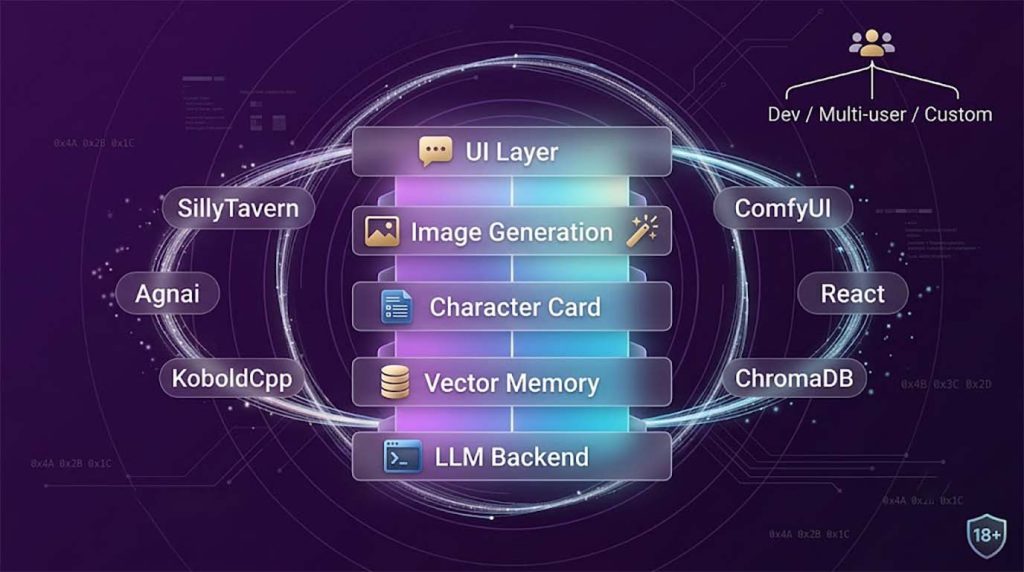
A full custom AI adult companion stack has five layers: a backend API server (FastAPI or Node.js), a vector memory database (ChromaDB or Qdrant), a model serving layer (Ollama locally or OpenRouter for hosted models), an image generation component (ComfyUI for on-demand visual output), and a user interface (React or Next.js frontend with a WebSocket connection for real-time chat). All components are open source and free to self-host.
The Backend — FastAPI and Ollama
FastAPI (Python) is the most commonly used backend framework for custom AI companion stacks — it handles the API routes, the conversation logic, the memory retrieval pipeline, and the orchestration between the LLM and the vector database. Ollama is the preferred local model server: a single command-line tool that downloads and serves GGUF models locally with a REST API at localhost:11434. FastAPI calls Ollama for completions, retrieves relevant memory from ChromaDB, assembles the full prompt with system instructions and context, and returns the response to the frontend.
For hosted model access without managing local GPU infrastructure, OpenRouter provides a single API endpoint that routes requests to 100+ models (Mistral, Llama, Qwen, Command R, and others) with per-token pricing. This removes the GPU hardware requirement entirely while keeping model flexibility — the companion can switch between models without changing backend code.
Layer 2 — Vector Memory: ChromaDB or Qdrant
The memory database sits between the backend and the LLM: every conversation turn is embedded into a vector and stored. When the user sends a new message, the backend queries the vector database for the most semantically relevant past exchanges and injects them into the context before calling the model. ChromaDB is the right choice for development and single-server deployments — it runs as a Python process with zero infrastructure overhead. Qdrant is the production-grade alternative: written in Rust, it handles larger datasets at lower latency and supports a managed cloud tier that keeps data within your infrastructure (important for NSFW content, where proprietary cloud vector services like Pinecone carry TOS risks).
Layer 3 — Model Serving: Ollama, OpenRouter, or vLLM
The model serving layer receives completion requests from the FastAPI backend and returns generated text. For local development, Ollama is the simplest option — one command downloads and serves a GGUF model with a REST API at localhost:11434. For hosted access without local GPU hardware, OpenRouter routes to 100+ models via a single API endpoint. For multi-user production, neither Ollama nor KoboldCpp is appropriate — they are single-user local tools. vLLM or Aphrodite Engine are the correct choices for concurrent user serving at scale: they use continuous batching to serve multiple requests simultaneously from the same GPU, which is what makes multi-user production economically viable.
Layer 4 — Image Generation: ComfyUI
ComfyUI is a node-based interface for running Stable Diffusion and FLUX image generation — and it exposes a REST API at localhost:8188 that any backend can call to request image generation. Integrating ComfyUI into an adult companion stack means the AI can generate on-demand images matching the current conversation context — if the character describes their appearance or a scene, a ComfyUI workflow can generate the corresponding image and display it in the chat UI.
The workflow is simple: the backend sends a prompt and parameters to the ComfyUI API, waits for the queued generation to complete, and returns the image URL to the frontend. Generation time depends heavily on model and hardware: SDXL on a mid-range GPU (RTX 3070 or equivalent) takes 8–20 seconds at 1024px; FLUX.1 requires 12–24 GB VRAM and can take 30–90 seconds or run out of memory on budget hardware when not quantised. For in-chat image generation, SDXL with a photorealistic adult LoRA is the more practical choice than FLUX for most consumer hardware. For the full technical breakdown of the image generation layer including LoRAs and model selection, see our guide to adult LoRAs and NSFW AI models.
Layer 5 — User Interface: React or Next.js with WebSocket
The frontend is a real-time chat interface that maintains a persistent WebSocket connection to the FastAPI backend. React (Vite) or Next.js are the standard choices — Next.js is preferred when you need server-side rendering for SEO or a built-in API layer; plain React with Vite is faster to set up for a pure SPA. The UI renders the character avatar, the chat history, a prompt input, and — if the image layer is integrated — a generated image panel. State management is minimal: the active conversation ID, the current character, and the streaming response buffer. Streaming (Server-Sent Events or WebSocket chunked responses) is essential for a good UX — it lets the AI's response appear word by word rather than after a multi-second wait for the full completion.
✅ Minimum Viable Stack — Start Here
The smallest stack that produces a working adult companion: Ollama (model server, free) + SillyTavern (frontend, free) + a GGUF model file (4–12 GB download). This setup runs entirely locally with no API costs, no internet connection during use, and no content filtering. It takes under one hour to set up on a machine with a recent GPU. Everything else — ChromaDB for persistent memory, ComfyUI for images, FastAPI for a custom backend — can be added incrementally once the basic chat loop is working.