


Section 01
What Is a Character Card and How Does It Define an AI Companion's Identity?
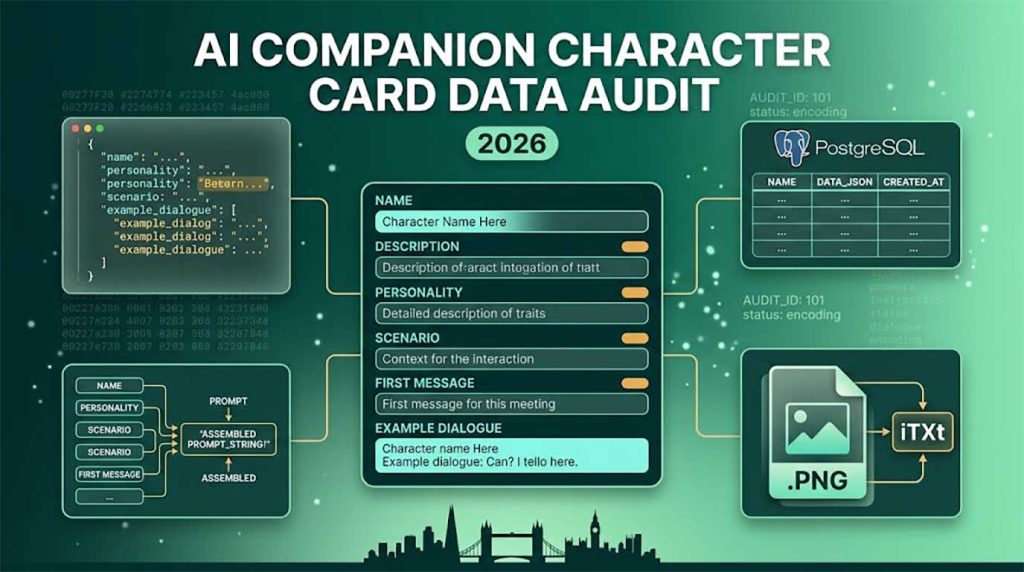
A character card is a structured data object — conforming to the community-standard Chara Spec v2 JSON schema — that encodes everything an LLM needs to consistently portray a specific AI companion: their name, physical description, personality traits, the scenario they inhabit, example dialogue showing their tone and speech patterns, and a system prompt override. This data is loaded at session start and injected into the LLM context before any user message is processed.
The Two Formats — Distribution vs Runtime
Character cards exist in two distinct formats serving different purposes. The distribution format is a PNG image file: the avatar image is visible to users and frontends, while the character's JSON data is embedded invisibly in the PNG's iTXt metadata chunk under the key chara. This makes the card a single portable file — one download, compatible with SillyTavern, Agnai, and any other Chara Spec v2 frontend.
The runtime format is a database row. In production, your application parses the JSON from the PNG on import, stores each field in a database table (PostgreSQL, SQLite, or a document store like MongoDB), and retrieves only the database record at session time — never re-reading the PNG file at runtime. The PNG is an import/export container; the database is the operational system.
Why the Standard Exists — Ecosystem Portability
The Chara Spec v2 standard emerged from the SillyTavern community as an open format that any developer could implement, ensuring that character cards created in one application could be imported into any other. Implementing Chara Spec v2 in your product means users can import thousands of existing cards from repositories like Chub AI and Character Tavern directly into your platform — with no conversion or re-entry of data required. This is a significant content acquisition advantage over a proprietary card format.
Section 02
What Are the Chara Spec v2 Schema Fields and What Does Each One Do?
Chara Spec v2 defines eight core fields that every character card must contain, plus optional extension fields. Each field serves a distinct function in the prompt assembly pipeline. Understanding what each field does determines how to design your character creation interface and how to validate incoming card imports.
| Field | Purpose | LLM Context Role | Typical Length |
|---|---|---|---|
| name | The character's display name | Used as the AI's speaker label in the chat log | 1–30 characters |
| description | Physical appearance, background, and core identity traits | Injected into system prompt — the main identity block | 200–800 tokens |
| personality | Behavioural tendencies in short tag-like phrases | Injected alongside description to reinforce character voice | 20–100 tokens |
| scenario | The situation or world context at conversation start | Sets the opening scene before the first message | 50–200 tokens |
| first_mes | The character's opening message to the user | Pre-seeded as the first assistant turn in the chat log | 50–300 tokens |
| mes_example | Sample dialogue pairs (user + character) | Few-shot examples that train tone and vocabulary | 200–600 tokens |
| system_prompt | Optional override of the global system prompt | Replaces or prepends to the application system prompt | 0–400 tokens |
| tags | Category labels for discovery and filtering | Not injected into context — used for search and UI only | Array of strings |
The Most Important Field: mes_example
The mes_example field is the most underrated and most impactful field in a character card. It provides few-shot examples of how the character speaks — sample exchanges in the format <START>\n{{user}}: ...\n{{char}}: ... — and these examples have a disproportionate effect on the LLM's output style. A card with a rich mes_example block will produce more consistent, character-appropriate responses than a card with a detailed description but empty examples.
When reviewing imported cards from community repositories, the quality of mes_example is the strongest signal of card quality. Two or three well-written example exchanges that demonstrate the character's vocabulary, sentence structure, and emotional register are worth more than a hundred tokens of description. Your character creation UI should prompt creators to write at least three example exchanges, and your validation layer should warn if this field is empty or contains fewer than 100 tokens.
Section 03
How Should Character Card Data Be Stored — PNG Embedding vs Database?
Character card data should be stored in two places: a database table for runtime access and query performance, and optionally the original PNG file for import/export compatibility. The PNG is the interchange format; the database is the operational store. Never read character data from a PNG file at session time in a production system.
Reading and Writing the PNG iTXt Chunk
The character JSON is stored in the PNG's iTXt metadata chunk under the key chara, base64-encoded. Reading it requires parsing the PNG binary: iterate the PNG chunks until you find an iTXt chunk with keyword chara, decode the value from base64, and parse the JSON. Writing it requires re-encoding the PNG with a new iTXt chunk added after the IHDR chunk. In Node.js, the png-chunk-text or sharp libraries handle this; in Python, Pillow provides PngImageFile.info access but requires manual chunk manipulation for writing.
Reading character data from PNG — Node.js
import { extractChunks } from 'png-chunks-extract';
import { decode } from 'png-chunk-text';
import { readFileSync } from 'fs';
import { atob } from 'buffer';

const buffer = readFileSync('character.png');
const chunks = extractChunks(new Uint8Array(buffer));

const textChunks = chunks
  .filter(c => c.name === 'tEXt' || c.name === 'iTXt')
  .map(c => decode(c.data));

const charaChunk = textChunks.find(c => c.keyword === 'chara');
const character = JSON.parse(atob(charaChunk.text));
The Database Schema
Each Chara Spec v2 field maps directly to a database column. Store text fields as TEXT in PostgreSQL or text in SQLite — not as VARCHAR with a length limit, since description and mes_example can be several thousand characters. Store tags as a TEXT[] array in PostgreSQL or as a JSON string in SQLite. Store the avatar image separately as a file path or object storage URL, not as a binary in the database — binary storage of images in relational databases degrades query performance across the entire table.
PostgreSQL schema — character cards table
CREATE TABLE characters (
  id            UUID PRIMARY KEY DEFAULT gen_random_uuid(),
  name          TEXT NOT NULL,
  description   TEXT NOT NULL DEFAULT '',
  personality   TEXT NOT NULL DEFAULT '',
  scenario      TEXT NOT NULL DEFAULT '',
  first_mes     TEXT NOT NULL DEFAULT '',
  mes_example   TEXT NOT NULL DEFAULT '',
  system_prompt TEXT NOT NULL DEFAULT '',
  tags          TEXT[] DEFAULT '{}',
  avatar_url    TEXT,
  creator_id    UUID REFERENCES users(id),
  is_public     BOOLEAN DEFAULT false,
  spec_version  TEXT DEFAULT 'chara_card_v2',
  created_at    TIMESTAMPTZ DEFAULT now(),
  updated_at    TIMESTAMPTZ DEFAULT now()
);
Section 04
How Do You Inject a Character Card into the LLM Context — the Prompt Assembly Pipeline?
Prompt assembly is the process of building the full context sent to the LLM on each turn: system prompt, character data, example dialogue, scenario, memory summaries, lorebook entries, recent chat history, and the current user message. The order and formatting of these components determines the quality and consistency of the LLM's character portrayal — this is the most important pipeline to get right.
The Standard Context Assembly Order
The convention used by SillyTavern and most production companion frontends assembles context in this order, from top (highest priority, least likely to be truncated) to bottom: (1) system prompt — the global application instructions plus the character's system_prompt override; (2) character description and personality; (3) scenario; (4) lorebook entries triggered by the current conversation; (5) memory summary of past sessions; (6) example dialogue (mes_example); (7) recent chat history; (8) the user's current message.
When context length is exceeded, the truncation order is the reverse: recent chat history is trimmed first (keeping only the most recent N turns), then memory summaries, then lorebook entries, then example dialogue. Character description and system prompt are never truncated — they are the identity foundation that must always be present.
Prompt assembly — simplified Python implementation
def build_context(character, session, lorebook_entries, max_tokens=4096):
    parts = []

    # 1. System prompt (never truncated)
    parts.append(f"[SYSTEM]\n{character.system_prompt or DEFAULT_SYSTEM}")

    # 2. Character identity (never truncated)
    parts.append(f"Name: {character.name}\n"
                 f"Description: {character.description}\n"
                 f"Personality: {character.personality}")

    # 3. Scenario
    if character.scenario:
        parts.append(f"Scenario: {character.scenario}")

    # 4. Lorebook entries (triggered by current message)
    for entry in lorebook_entries:
        parts.append(entry.content)

    # 5. Memory summary of past sessions
    if session.memory_summary:
        parts.append(f"[MEMORY]\n{session.memory_summary}")

    # 6. Example dialogue (few-shot)
    if character.mes_example:
        parts.append(character.mes_example)

    # 7. Recent chat history (truncated if needed)
    parts.append(session.get_recent_history(max_tokens=max_tokens))

    return "\n\n".join(parts)
Template Variables — {{user}} and {{char}}
Chara Spec v2 uses two template variables throughout card fields: {{user}} (replaced with the user's display name at runtime) and {{char}} (replaced with the character's name field). Your prompt assembly pipeline must replace these variables before sending the context to the LLM — if they reach the model unreplaced, the model will generate responses mentioning {{char}} as a literal string. Process replacements as the last step before LLM submission, after all fields have been assembled into the context string.
Section 05
How Do You Build the Character Creation Interface for an AI Companion Platform?
The character creation UI must expose all Chara Spec v2 fields with appropriate input types, validation, and real-time token counting — since character data competes with chat history for the LLM's context window. The most important UX decision is guiding creators toward high-quality mes_example and description fields, which have the greatest impact on character consistency.
Character Card Fields — Impact on AI Output Quality vs Creator Effort
Token Counter — Essential for Creator UX
Every text field in the character creation form should display a live token count as the creator types. Token counts — not character counts — are what determine how much context budget the card consumes, and creators need to understand the trade-off: more detail in the card means less space for recent chat history in the context window. A reasonable guideline to surface in the UI is keeping the total card token budget (all fields combined) under 1,500 tokens for an 8k context model, and under 3,000 tokens for a 32k context model.
Tokenisation differs by model family — a GPT-4 tokeniser counts differently from Llama's. For a frontend token counter, the tiktoken library (JavaScript port: js-tiktoken) provides accurate counts for OpenAI models. For other model families, use character count divided by 3.5 as a rough estimate. Show the count as "X tokens / Y budget" with a colour shift to amber at 80% and red at 100% of the recommended limit.
Section 06
How Do You Handle Character Card Versioning and Updates Without Breaking Active Sessions?
Character card versioning is a production problem that becomes critical as your platform grows: when a character's creator updates its description or personality, active sessions using the old version must not be broken. The solution is to version character records and pin sessions to a specific version at creation time, loading only the pinned version for existing sessions.
Version Pinning — How to Implement It
When a session is created, record the character's current version identifier (a version_id UUID or an integer counter) in the session record. On every subsequent turn in that session, load the character data for that pinned version_id — not the latest version. Character updates create a new version row; the old version row remains in the database and continues to serve active sessions. Sessions can be migrated to a new version explicitly (user action) or automatically at the start of a new session, but never mid-session without user consent.
The Database Pattern — Character Versions Table
Store versions in a separate character_versions table linked to the main characters table. The characters table holds the canonical identity (id, creator, created_at, current_version_id); the character_versions table holds each version's field content (description, personality, scenario, etc.). Sessions reference character_versions.id directly. This pattern allows soft deletion of versions — marking old versions as deprecated without deleting the data, preserving session integrity for users who have not yet migrated. When all active sessions using a version have ended, the version can be archived to cold storage.
The Full Builder Context
The character card system is one layer of a complete AI companion stack. For how the card data feeds into the broader backend architecture — the FastAPI server, the memory database, the LLM connector, and the UI layer — see our full AI companion tech stack guide. For the LLM models that process the context the card system produces, see our guide to AI models for adult content generation.